Geo Tracker - Phone Locator
- 3.4
- Rating
- 500.00K
- Installs
- Free
- Price

 Analysis by App-foxy
I tried Geo Tracker - Phone Locator with one question in mind: does a focused location tool make staying connected with friends and family easier than using a general map app? My answer is a qualified yes. Its main appeal is the idea of seeing a person’s live position and receiving location-related alerts in one place, rather than opening a map and manually checking where someone might be.
That distinction matters in everyday situations. A normal navigation app is excellent for finding an address, planning a route, or checking traffic, but it is not necessarily designed around keeping track of people. This app sits in the Maps & Navigation category and takes a more personal approach. It is free to install, carries an Everyone age rating, and is developed by CA CA COMPANY LIMITED.
My overall impression is that the app is most interesting for small groups who need practical coordination: relatives meeting across town, friends travelling together, or someone waiting for another person to arrive. It is less convincing as a complete replacement for a mature navigation service. The difference is not about having a map on the screen; it is about making a person’s current location the center of the experience.
You May Also Like

 Blood Strike: 2.5 Anniversary
Blood Strike’s Loadouts Turn Every Drop Into a Tactical Gamble
A close look at Blood Strike’s custom loadouts: how fast access to signature weapons reshapes its battle royale rhythm, rewards preparation, and narrows the gap between fights.

 Pandora - Music & Podcasts
Pandora’s Music Is Easy to Start, but Harder to Recover
Pandora’s strength is its low-effort path from a seed to a station. Its weak spot is how much confidence it asks you to place in connection, setup, and quiet recovery.

 8 Ball Pool
 Is Built on Rivalries, Rematches, and Routine
A close look at the rivalries, rematches, shared routines, and unanswered safety questions that turn a quick pool match into a persistent mobile community.

 Samsung Music
’s Quiet Strength Is Playing What You Already Own
Its reach comes less from spectacle than from dependable access to a personal library. That simplicity is both the app’s strongest retention engine and its ceiling.

 AccuWeather: Weather Radar
AccuWeather Review: A Quick, Clear Forecast for Everyday Decisions
For everyday plans, the best forecast is the one you can understand quickly. AccuWeather makes rain timing, radar, and local conditions easy to act on, with a few trade-offs.

 Hill Climb Racing
Why Hill Climb Racing Still Turns Crashes Into One More Run
A tiny car, a bumpy hill and one more upgrade: Hill Climb Racing keeps resurfacing because its simple chaos makes every near-miss feel personal.
More From Our News Desk



Live location is the feature that changes the experience
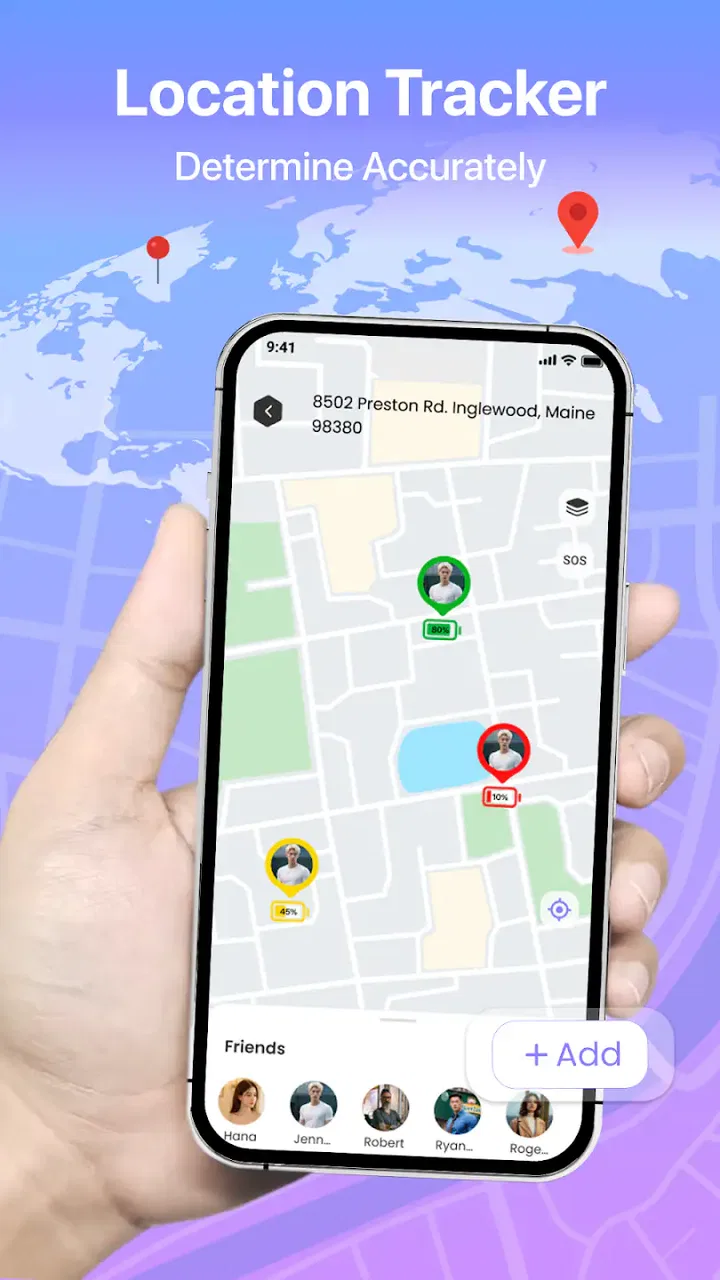
The strongest capability here is live location sharing. Instead of relying on messages such as “I’m nearly there” or repeatedly asking someone to send a pin, the concept lets you follow movement as it happens. That can remove a surprising amount of uncertainty from ordinary plans.
In my experience, the useful part is not watching a moving marker for entertainment. It is being able to answer a simple question without interrupting someone: are they still on the way, have they reached the meeting area, or are they moving in the wrong direction? When the app is used by people who have already agreed to share their positions, that information can make coordination calmer and more direct.
The alert side is equally important. A location alert can be more useful than a one-time location message because it turns a change in position into something you can notice without constantly checking the screen. For a parent waiting for a teenager to return, a friend meeting someone at a busy station, or a group trying to regroup during a day out, that shift from manual checking to an alert-based workflow is the real reason to consider this app.
The practical benefit is reduced checking, not more map detail. If your main need is turn-by-turn directions, this is not automatically better than the navigation app already on your phone. If your problem is uncertainty about another person’s progress, the emphasis on tracking and alerts is much more relevant.
What the app changes compared with ordinary location sharing
A standard map service often makes you start with a destination. You search for a place, choose a route, and follow instructions. Geo Tracker - Phone Locator starts from the other direction: the person is the point of interest. That makes it feel closer to a coordination tool than a traditional route planner.
This difference affects how I would use it. I would not open it first to explore restaurants or compare driving routes. I would open it when the important question is where a friend or relative is now. That narrower purpose is a strength when it matches your situation, but it also means the app may feel limited if you expect a full navigation suite.
The store listing describes it as a smart GPS and phone locator for friends, alerts, and live location. I read that as a clear indication of its intended role: helping people stay aware of one another’s whereabouts. It should be approached as a shared-location utility, not as a universal answer to every travel problem.
How I would use it in practice
The first step is agreeing on the purpose of tracking before anyone starts. Location sharing works best when everyone understands who will see the position, why it is needed, and when the arrangement should end. Even when an app is simple, that conversation prevents the tool from becoming intrusive or confusing.
For a short meeting, I would use the app as a temporary coordination channel. One person can share their position while travelling, and the other person can check progress or rely on an alert instead of sending repeated messages. Once the meeting is over, I would stop treating the live view as necessary. That habit keeps the feature useful rather than turning it into background surveillance.
A less obvious use is managing a moving group where people do not stay together. Imagine several friends arriving at a large venue from different directions. A static pin only tells you where someone was when they sent it. A live location view can provide a better sense of whether the person is approaching, circling the entrance, or taking a different path. That is especially helpful when phone calls are inconvenient because of noise or poor reception inside a crowded area.
Another useful workflow is for a person who is responsible for meeting a family member at a changing time. Instead of asking for an update every few minutes, the person waiting can watch for movement and decide when to leave the house or walk toward the pickup point. The trade-off is that both sides need to use the feature deliberately; a locator cannot create accurate coordination if the tracked person has not enabled or maintained sharing.
I would also treat alerts as reminders to act, not as proof that every movement is perfectly represented. Location tools depend on the phone, its connection, and the quality of the positioning signal. A delayed update could make someone appear stationary for longer than expected. That is why I would still send a message if timing matters, particularly for a child, an older relative, or anyone travelling in an unfamiliar place.
A realistic everyday example
Picture a friend travelling across a city to meet you at a busy shopping center. You arrive first, but the entrance has several similar doors and the surrounding streets are crowded. With ordinary messaging, you might exchange several vague updates: “I’m close,” “Which side are you on?” and “I think I passed it.” With a live location view, you can see whether your friend is nearing the correct side and choose a meeting point that matches their actual approach.
The useful insight is that the app can reduce the number of decisions made through text. It does not necessarily make the journey faster, and it does not replace directions, but it can make the final part of a meeting less frustrating. If an alert tells you that the person has entered the agreed area, you can focus on finding them instead of repeatedly reopening a conversation.
For this scenario, I would create a simple rule: share location only for the journey and the meeting window, then end the arrangement. That keeps the feature aligned with a clear task and gives both people a natural stopping point.
Where the experience has friction
The first limitation is that a people-tracking app depends on cooperation. It cannot show a useful live position if the other person does not want to share it, forgets to enable it, or stops using the feature. That sounds obvious, but it changes the buying decision. This is not a private tool that solves someone else’s location problem on its own; it is a shared service that requires agreement.
There is also a social trade-off. Live location can make plans easier, but it can also encourage unnecessary checking. I would avoid using it as a way to monitor someone’s routine or demand constant explanations for every stop. The best use is specific, time-limited, and connected to a real need such as meeting, travelling, or getting a safety alert.
Compared with established map applications, the likely compromise is breadth. General map apps usually offer a wider collection of navigation functions, place discovery, route planning, and traffic-oriented tools. Geo Tracker - Phone Locator is more appealing when the person you are meeting matters more than the destination you are searching for. If you mainly need directions, I would choose the familiar navigation option first and use this app only when shared tracking adds value.
Another point worth considering is cost. The app itself is free, but it includes in-app purchases priced at $9.99 per item. That means I would examine the available paid options before building an important routine around the service. A free starting point is useful for testing whether your group actually uses live tracking, while the purchase price makes it sensible to confirm that the specific extra capability is worth paying for.
The current version is 1.0.8, and the app requires Android 10 or later. In practical terms, that makes compatibility an early check before inviting family or friends to join. A tracking plan is only as reliable as the least compatible phone in the group, so I would verify the devices first rather than discovering the issue on the day of a trip.
Privacy is another area where I would be careful in practice. I would share with people I trust, use the shortest useful time window, and avoid leaving a location session active simply because it is convenient. The app’s purpose makes personal location central to the experience, so responsible use matters as much as the map itself.
What the rating suggests about expectations
The app has an average rating of 3.4 from around 614 ratings, with five written reviews shown in its store presence. I would interpret that as a reason to approach it with realistic expectations rather than assuming a polished, universal solution. The concept is clear, but people’s experiences with location tools can vary depending on their phones, connectivity, group habits, and expectations about alerts.
That rating also reinforces my advice to test the basic workflow before paying for anything. Invite the person you actually plan to track, try a short journey, see whether the alerts fit your routine, and decide whether the experience is less troublesome than your current method. A location app earns its place when it removes friction; if it creates more checking and explanation, it is not helping.
Who gets the most value from it
I think this app is best suited to people who regularly coordinate with a small circle and want a dedicated way to see progress. Families may appreciate it during pickups or short trips. Friends can use it when meeting in crowded places. Travellers moving as a loose group may find it easier to regroup when everyone is not walking together.
It can also suit someone who dislikes constant messaging but still needs a practical arrival signal. The combination of live location and alerts is more convenient than asking for updates when the situation is predictable and everyone has agreed to the arrangement. The key is that the app should support a plan, not become the plan itself.
I would be more hesitant to recommend it to someone who only wants route directions, public transport planning, or nearby-place discovery. Those needs belong more naturally to a broad navigation app. I would also suggest skipping it if the people you need to coordinate with are unlikely to install or use a separate locator. A technically suitable feature is not useful when the group will continue relying on ordinary calls and messages.
For parents and caregivers, I would frame it as an optional coordination aid rather than a guarantee of safety. A live marker can help with agreed journeys, but it should not replace direct communication or sensible travel arrangements. Location data can be delayed or misunderstood, and an alert should prompt a check when something seems unusual rather than provide false certainty.
My recommendation after using the concept as intended
With more than 500K installs, the app has attracted a substantial audience for a focused tool, although its rating suggests that it will not satisfy everyone equally. I see the strongest case when a group has one clear problem: knowing where people are during a journey or meeting without sending a stream of messages.
I would start with the free version and a small, time-limited test. Choose one ordinary situation, such as meeting at a busy location, and judge whether the live view and alerts genuinely make the arrangement easier. If they do, the app may become a handy part of your group’s routine. If you still need to open a separate map for every important step, that is not necessarily a failure; it simply means this tool works best alongside navigation rather than replacing it.
My final view is positive but selective. Geo Tracker - Phone Locator has a clear purpose, and its focus on shared live location can solve a real everyday annoyance: not knowing whether someone is still travelling, nearby, or already at the meeting point. I recommend it to people who value that specific capability and are comfortable setting boundaries around sharing. For everyone else, especially users seeking a complete mapping and route-planning experience, a conventional navigation app remains the better first choice.
FAQs for Geo Tracker - Phone Locator
01What features does Geo Tracker - Phone Locator offer?
Geo Tracker - Phone Locator provides real-time location tracking, route history, and geofencing alerts. It allows users to monitor the whereabouts of family members or employees, ensuring safety and accountability. The app also offers location sharing with friends and has an emergency SOS feature for quick alerts.
02Is Geo Tracker - Phone Locator secure and private?
Yes, Geo Tracker - Phone Locator prioritizes user privacy and data security. The app uses encrypted connections to transmit location data and allows users to control who can access their location information. It complies with privacy regulations and offers customizable settings to enhance user control over their data.
03Does Geo Tracker - Phone Locator consume a lot of battery power?
While any location tracking app uses some battery, Geo Tracker - Phone Locator is optimized for efficiency. It employs smart algorithms to minimize battery usage by updating location data only when necessary. Users can also adjust settings to balance between tracking accuracy and battery consumption.
04Can I use Geo Tracker - Phone Locator without an internet connection?
Geo Tracker - Phone Locator requires an internet connection for real-time tracking and data synchronization. However, it can still log location data offline, which will be uploaded once the device reconnects to the internet. This ensures continuous tracking even in areas with poor connectivity.
05Is Geo Tracker - Phone Locator compatible with all devices?
Geo Tracker - Phone Locator is available for both Android and iOS devices. It supports a wide range of smartphones and tablets running on the latest operating systems. Users should ensure their device meets the minimum system requirements for optimal app performance.
Pros
- Accurate real-time location tracking.
- User-friendly interface for easy navigation.
- Low battery consumption compared to others.
- Supports multiple devices for family use.
- Offline mode available for remote areas.
Cons
- In-app ads can be distracting.
- Premium features require subscription.
- Limited customization of alerts.
- Occasional GPS signal issues.
- No integration with smartwatches.

Geo Tracker - Phone Locator
Gallery